
If you have a tablet device or even a laptop with a compact keyboard and a trackpad, you will know that it is not always easy to navigate and type. All tablets are touchscreen and even though the “keys” for typing can be quite accessible, it is not really designed for typing more than a few lines. The solution is to get a wireless keyboard mouse combo.
And one thing I personally dislike are the trackpads that come with virtually all laptops, be they PC or Apple. Having said that we are often asked what is the best keyboard that feels like a laptop. Laptop keyboards can be quite difficult to use in some cases trying to manipulate the cursor and especially when highlighting text or areas of the screen.
Is a wireless keyboard mouse combo the solution?
So what is the solution? For me it is a wireless keyboard mouse combo that solves both problems. There are many different makes and options these days, like a foldable wireless keyboard for ease of transportation or an ultra thin wireless version for space saving and an ergonomic look. Most are also rechargeable so you should always have it available to use even when away from your home or office. A three month battery life gives plenty of usage per charge which can be carried out with a micro USB cable.
What are the features to look for?
Most have features like an intelligent auto sleep function and an on off button that will help to preserve power for even longer and extend the life of the battery. Plug and play is standard for these devices so there is no need to download drivers, just plug the small wireless receiver into a USB port and you are ready for action.
And talking of action, all keyboards have a slightly different feel when pressing the keys. There are some great options if you are looking for a low profile wireless keyboard. For instance the Seenda Slim is a popular model with quiet keys and a responsive touch.
It does lack the numeric keypads so if you are particularly looking for that, then something like the Sonkir K-18 Ultra Thin Keyboard Mouse Combo might be better suited.
What about connectivity?
And another issue some users may worry about is the connection and whether it is stable or not. It is very frustrating when typing an important email or document and suddenly the keyboard or mouse loses the connection. The above Sonkir model uses the advanced 2.4Ghz wireless protocol to use one shared receiver for both the mouse and keyboard and therefore tying up just one USB port. With a range of up to 10 metres it is more than adequate for most users.
The majority of portable wireless keyboard mouse combos will be compatible with all versions of the Windows and Mac operating systems but check to be sure before purchasing.
If gaming is your thing, then a specifically designed wireless mechanical keyboard will be top of your list. These are high performance wireless keyboards with programmable keys and will make a huge difference to your gaming experience. If portability is important, then a mini wireless keyboard with touch pad mouse will be what you need to move about with ease. Or a wireless keyboard with trackball is another option to consider rather than touchpad.
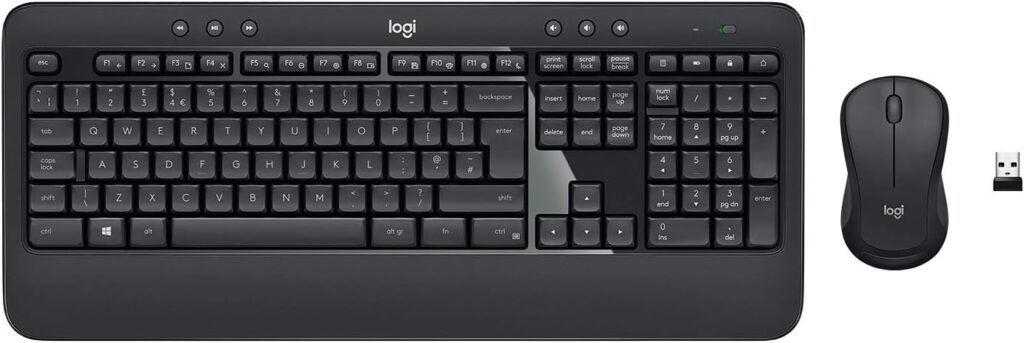
This Logitech keyboard and mouse combo with multimedia hotkeys is a great choice.
Buy on Amazon
Why a wireless keyboard mouse combo is the best solution?
A wireless keyboard and mouse combo is often considered a convenient and versatile solution for several reasons, but whether it’s the “best” solution depends on individual preferences and use cases. Here are some advantages of using a wireless keyboard and mouse combo:
- Cable Management:
- Advantage: A wireless combo eliminates the need for multiple cables, reducing clutter on your desk. This can create a neater and more organized workspace.
- Flexibility and Mobility:
- Advantage: Wireless devices provide greater freedom of movement. You can use them from a distance without being restricted by cables, which is particularly useful for presentations, living room setups, or situations where you prefer to sit farther from the screen.
- Clean Aesthetic:
- Advantage: Wireless peripherals contribute to a cleaner and more aesthetically pleasing look, especially if you have a minimalistic or modern setup.
- Easy Installation:
- Advantage: Wireless keyboards and mice are generally easy to set up. Most modern systems support plug-and-play functionality, reducing the hassle of dealing with multiple cables and connectors.
- Reduced Desk Clutter:
- Advantage: Without the need for cable management, your desk can look less cluttered and be easier to clean. This can create a more organized and visually appealing workspace.
- Portability:
- Advantage: Wireless keyboards and mice are often more portable, making them suitable for users who frequently move between different workstations or locations.
- Bluetooth Connectivity:
- Advantage: Many wireless keyboard and mouse combos use Bluetooth technology, which allows for easy connectivity to a variety of devices, such as computers, tablets, and smartphones.
Despite these advantages, there are some considerations:
- Battery Life: Wireless devices require power, and you’ll need to ensure that the batteries are charged or replaced regularly.
- Latency: While modern wireless technology has minimized latency, some users may still notice a slight delay compared to wired peripherals, particularly in gaming or high-precision applications.
- Initial Cost: Wireless keyboard and mouse combos can be more expensive than their wired counterparts.
Ultimately, the “best” solution depends on your specific needs and preferences. Some users may prioritize the cleanliness and flexibility of wireless options, while others might prefer the reliability and potentially lower cost of wired peripherals. Consider your own usage patterns, the specific demands of your tasks, and your personal preferences when making a decision.