Mobile Speed Camera Detector

Anyone who has been caught speeding and had to pay a hefty fine, would have loved to have had a mobile speed camera detector in the car. These days there are so many speed cameras on the roads to catch speeding motorists that even on a regular route, their location would be difficult to remember. A great number of these cameras are cleverly hidden and not easily visible to the naked eye.

Speed cameras play an important role in making our roads safe and preventing accidents caused by drivers going too fast. For instance in an area which has narrow roads and cars parked on both sides, it is vitally important speed that limits are adhered to. This is because someone might suddenly step out of their car or a child dash out into the road. Similarly on motorways and highways where it is easy to go beyond the speed limit, bad accidents can occur with tragic circumstances. So having this type of detector will help to eliminate these dreadful occurrences.

However there are some areas where speed cameras are placed that seem to be there purely for catching out motorists. And they do this to generate revenue for the relevant local government administration. One way drivers can be alerted to these is to have a car speed camera detector so they aren’t easily caught out.

Drive safely with your car speed camera detector

These devices nowadays are very advanced and innovative using red light to detect speed cameras. Utilising a comprehensive database with the latest road updates, they will help you stay within the speed and keep you driving safely. A speed camera detector device like the award winning Cheetah C550 has over 25,000 possible combinations for the vocal descriptions. And this for every alert so you can set which one you feel most comfortable with. So in what is called the “whisper mode”, the detector won’t alert you if you are within the speed limit. As a driver you will not want to be distracted by constant alerts so this is a welcome option to have at your disposal. Or if you do know the route you regularly take, you can engage cancel mode but won’t be alerted to any cameras.

Reading the display for both initial set up and driving is also very important to get the best out of your mobile speed camera detector. You can adjust the brightness which you will want for driving in dark or night conditions. The distance from the speed camera that the warning alert is triggered can also be varied to suit your speed to allow enough time to correct it.

The best speed camera detector will be able to identify by GPS, all types of fixed cameras. These include Gatso, SPECs, Hadecs, Monitron, Truelvo and others. They will also give you free updates for life so that you don’t have to have a subscription and keep paying to get the latest locations.

How is your mobile speed camera detector mounted?

Many models come with a windscreen or dashboard mount and some you can place above the rear view mirror. The dashboard will be most convenient with those that come with a 12V in car cigarette lighter power cable. This so that you don’t have the lead interfering with your line of vision while charging. A USB cable will also be standard for connection to a computer.

If you are travelling in different territories then it will be crucial that your particular model displays the alerts in either MPH or KPH, dependent on which country or continent you are.

Different types of vehicle

Another very important feature of your GPS speed camera detector is the ability to select what type of vehicle you are driving. On all roads you have different speed limits for the varying types of vehicles and the correct limit needs to be alerted. So if you are driving a truck, motor home, towing a trailer or just a standard car then be sure you have chosen the right vehicle category.

Some top of the range detectors will be able to filter out false alerts that may occur from pedestrian crossing monitors and automatic door sensors. They may also include an HD wide angle dash camera and optional rear view camera which is a great added extra to have. A micro SD card comes with these models to capture the dash cam footage.

Are all cameras switched on?

AS everybody knows, not all cameras are switched on and operating. The best speed camera detector will alert you as to whether the radar is operating and that the camera is live. Often the cameras that are not switched on are prominently placed so they are visible in order to be a deterrent. But there is no way of knowing which are on and which are off so this feature is very useful.

 The most important thing is driving safely and within the prescribed speed limits of the road you are on. Observing the rules of the road and with the help of a mobile speed camera detector, you and your fellow citizens will travel safely and experience many years of driving enjoyment.

Spy Camera Watch

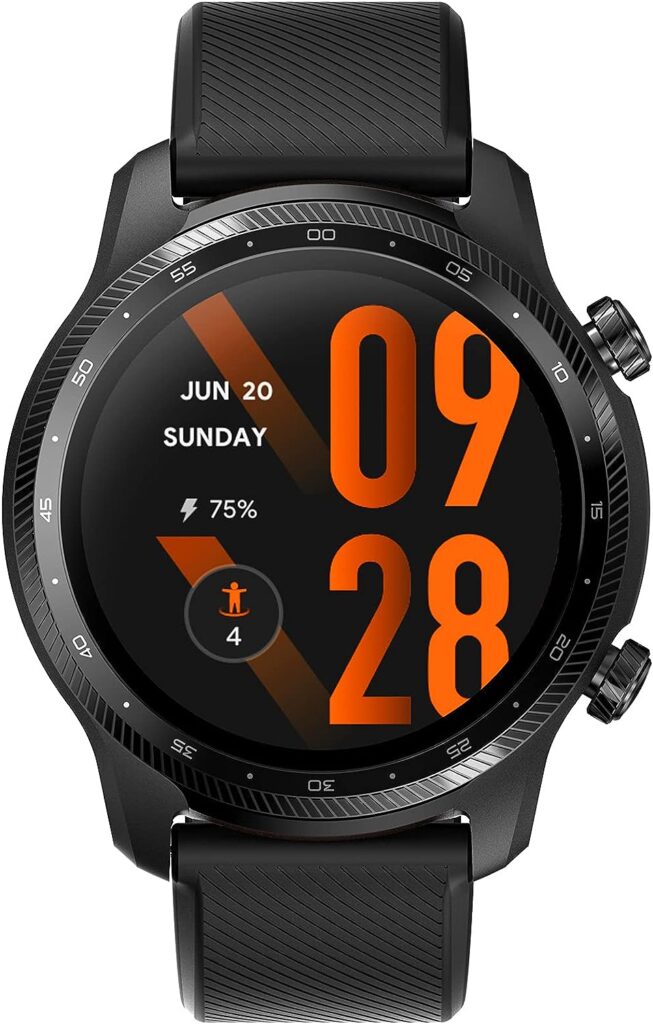
There are many reasons why you may want to own a spy camera watch. Investigation work would be a primary usage so that you may operate under cover and film covertly without an obvious camera. You may also want to record a conference without attracting attention or document a conversion for legal purposes while visually identifying the speaker.

The video quality many of these watches can produce is high definition 1080p, otherwise known as full HD. This is important as being able to clearly identify images and individuals is the most important aspect of a hidden camera. A Spy camera watch can also take still pictures and record audio separate to the video film.

How long will your spy watch record for? It varies from watch to watch but you can expect around 90 minutes of continuous recording. Saving every few minutes and automatic over writing of the oldest files on the SD card are another great feature of these watches.

Function buttons are usually for one action only such as recording video with one, photos with another and audio with a third button. The importance of simplicity is paramount when using these as you won’t want to be fiddling with various button presses when trying to film without drawing attention.

Night vision is another feature offered by a number of different makers which will make a big difference for those operating after dark. An infrared LED facilitates filming in low level lighting. Water resistant watches help protect when shooting on rainy days and will be essential for those working regularly outdoors.

A spy camera watch can also be used standalone as a surveillance camera. Fitted with a motion detector, it could be left as a security camera in the home to guard against intruders. Or it could be placed in a child’s bedroom to monitor a nanny and asses the level of care. Similarly in an old age home to monitor the carers looking after an elderly relative. Also keep an eye on your pet.

Another use for your camera watch could be as a webcam or PC camera and also as a spare disk. Connected to your PC, footage can be downloaded and then viewed on your PC monitor.

There are no indicator lights when the camera is recording so no one looking at the watch will be able to identify it as a camera recording video and audio. It goes without saying that is vital in ensuring undercover operation.

Watches are charged by simply connecting the USB to a PC or adapter. Filming can continue while the watch is being charged.

Some watches also have a fitness tracking facility which give them yet another way of providing a usefulness for those involved in sporting activity. Along with an activity tracker, you get a pedometer and also a sleep monitor on some models.

Spy Camera Clock

Similar in many aspects, the spy camera clock has a number of the same functions as its watch counterpart. Designed as an alarm clock, it can record high quality video in HD.

Where they differ is that they can be viewed remotely via an app and so you can see live video footage which make them even more useful for surveillance purposes. Perfect night vision and motion detection also allows you to see in near total darkness while remote playback provides for great functionality. Multiple users can also view the video remotely.

You can get various styles of a spy camera clock. Most are of the alarm clock variety as virtually everyone has one of these. Most common are digital alarm clocks with the time prominently displayed which wouldn’t suggest that they contain a mini video camera. But you can also get a wall clock which looks totally unobtrusive and highly unlikely to be thought of as spy camera.

These devices are so useful for all sorts of monitoring purposes, particularly for young children and older people who may be vulnerable in the care of others. You may even wish to place one on your work desk if you find things go missing when you are not there. The fact that you can view live footage on your phone from anywhere in the world, provides great peace of mind when you are away on holiday and want to keep an eye on your home.

When you need cover, go undercover!

2K Ultra Spy Watch

Spy watches often incorporate small cameras for discreet recording, and the specifications can vary.

When looking for a spy watch with 2K ultra resolution or similar features, consider the following factors:

  1. Video Resolution: Look for a spy watch that offers at least 2K ultra resolution for clear and detailed video footage.
  2. Camera Quality: Consider the camera’s overall quality, including low-light performance and the ability to capture clear images in various conditions.
  3. Storage Capacity: Check the storage capacity of the watch. Some models have built-in memory, while others may support external microSD cards.
  4. Battery Life: Consider the battery life of the spy watch. Longer battery life allows for extended recording sessions.
  5. Discreet Design: Spy watches are designed to be discreet, resembling regular wristwatches. Ensure that the design is inconspicuous to avoid drawing attention.
  6. Additional Features: Some spy watches may come with additional features such as waterproofing, night vision, or motion detection. Choose based on your specific requirements.
  7. Ease of Use: Check the user interface and controls to ensure that the spy watch is easy to operate.
  8. Audio Recording: Confirm whether the spy watch supports audio recording, as this may be important depending on your use case.

It’s important to note that the use of spy devices, including spy watches, is subject to legal regulations in many jurisdictions. Before purchasing and using such a device, familiarize yourself with the laws regarding surveillance and privacy in your area.

Additionally, the availability of specific models may change, and new products may be introduced to the market after my last update. Therefore, I recommend checking with reputable retailers, spy gear specialty stores, or online platforms for the latest options and reviews.

Best Portable Midi Keyboard

Looking to play your VST synths in a DAW on your laptop or PC, then you will want the best portable MIDI keyboard. This will give you more flexibility as to where you can make your music.

What is Midi?

Firstly what is MIDI? MIDI stands for musical instrument digital interface. It is a way of connecting hardware music synthesisers, sound modules, drum machines and other sound generating equipment. It can also connect to your digital audio workstation. This allows you to play software versions of synths and drum modules and other devices like effects. Midi can be connected via a dedicated 5 pin midi port or via USB or Bluetooth.

There are many midi keyboards on the market with different functionality, size and portability. So it is important to define how and where you will be using it before making your purchase. Of course price is always a determining factor so finding the best cheap midi keyboard will be important.

Size and Portability

For this article we will concentrate on portable midi keyboards for those musicians who make music on the go.

A particular favourite of ours is the AKAI MPK Mini MKII which is a 25 key USB connected and powered keyboard. It has velocity sensitive mini keys that are surprisingly playable. It also has 8 backlit pads for playing drum sounds, for instance in your Ableton drum rack. There are 8 assignable knobs to map to your soft synth to control filter cutoff for example, and a 4 way joystick. You get octave up and down buttons and an arpeggiator with adjustable modes and resolution. Note repeat is another nice touch to quickly create runs of 8th, 16th etc. notes. And when you register your MPK Mini you get some great free sounds. These from the likes of Splice and Loopcloud which is the largest sample library around.

The Arturia Minilab MkII 25 Note controller keyboard is another excellent choice and matches up to the Akai MPK. Also with 25 velocity sensitive keys, it offers 16 rotary encoders to give you huge mapping possibilities. These will allow you to tweak all sorts of parameters to your heart’s content. And the two touch strips give you pitch bend and even more modulation possibilities to get creative with your sound. This is a really great small midi keyboard and it comes with a version of Ableton Lite. Also included is Arturia Analog Lab 2 that gives you sixteen fantastic synths, pianos and organs.

The Arturia Microlab is the option if you really want to go compact. It is extremely compact and with only four buttons and two touch strips, you still have loads of control. A great feature is playing chords with just one note, a bonus for those who don’t have great playing skills. The USB port is recessed so no cables protrude making it easy to transport. And a rubberised case help protect it during travel. Comes with free software and fantastic value for money make it a no brainer.

Use With Ableton Live

Next up is the Novation Launchkey 25 Mk2 Midi Controller keyboard. Again like the others mentioned, it offers 25 synth action keys and excels with 16 velocity sensitive RGB pads. These will get those finger drummers tapping away and there are also 8 knobs for tweaking. Like the others, it comes with great software including Live Lite and Novation’s own excellent V and Bass Station synths.

The Launchpad has been designed specifically to integrate with Ableton Live. Ableton is probably the most popular DAW on the market. Just connect via USB and you get immediate hands on control of your synths, drum racks and session view parameters. Start moving those faders on the mixer and effects dry/wet controls for example. The pads can be used to launch and stop your session view clips. And get this, the RGB colour pads will match the colour of the clips in the software. Nice! This would be a top choice as the best midi keyboard for Ableton.

Another great Novation option.

Sticking with Novation, if you were looking for the best midi portable keyboard for Logic Pro X then the Novation Impulse 61 Keys would have to be a major contender. The Impulse differs in that it is a full size piano style semi-weighted, ultra responsive keyboard with aftertouch that has been designed for those who play keys. It will adapt to playing instruments such as piano, organ or synthesiser. As such this is not a particularly portable midi keyboard controller but that aspect is more than made up with all that it offers. Definitely a choice for the more proficient keyboardists out there.

For Logic users you get mixer, transport and plug in control of Logic’s own plugins as well and VST versions. 9 faders, 8 backlit drum pads, 9 assignable buttons, 8 control knobs and 6 transport buttons give you tremendous control over your DAW , instruments and effects. It does weigh 6.5Kg so will be suited to be your main studio midi controller keyboard. The choice for those who want playability more than anything else, this would be a leading contender as the best weighted midi keyboard.

Less well known brands.

One other option to look at is the Nektar Impact LX25. Not one of the more well known brands, but this one has pretty much everything you need to take control of your synths and fx. A very good option for the best mini midi keyboard, the Nektar offers integration for all the major Daws like Ableton, Logic, Reason, Bitwig, FL Studio, Reaper and others. In fact this model seems to be highly favoured by the Reaper community and once registered comes with a downloadable zip file to get to get you set up and configured straight away. Having a great build quality, you get octave control buttons, “hyper sensitive” led illuminated drum pads that are easily assigned and transport controls which is something we really love. With all these controllers, the software they come with determines how easy it is to set up and play.

Auto selection of parameters

The Nektar allows you to control parameters as soon as you select an instrument track which is assigned automatically. It also has a “grab” mode so you can temporarily assign parameters by simply holding “shift” and clicking and adjusting a parameter on the software, then moving  the control on the Nektar. Very useful for quickly tweaking a parameter that was not automatically mapped. This one has to be a choice for the best budget midi keyboard.

How will you use your best portable midi keyboard

All in all the choice for a small midi keyboard depends on your how you want to use it, your space requirements and how important portability is for you. Having so many available that all cover basic requirements for controlling midi on your software or hardware standalone units, you are truly spoilt for choice.

Most portable midi keyboard

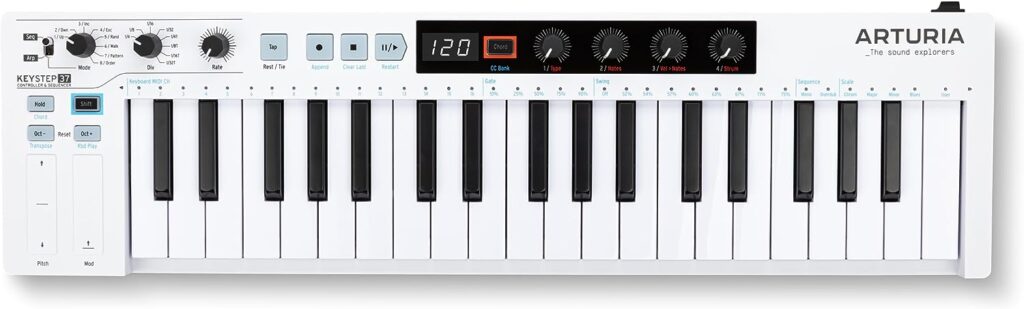
The Arturia Keystep 37 is a MIDI controller and polyphonic sequencer produced by Arturia. It’s an extended version of the original Keystep, offering additional features and a larger keyboard.

The keyboard feels very solid and weighty but without being so much so that you wouldn’t use it as a portable keyboard. Key action is probably the best we’ve used at this price point and size of keyboard.

Here are some key features and details about the Arturia Keystep 37:

  1. Key Features:
    • 37 Slim Keys: The Keystep 37 features a 37-key, slim-key keybed that is velocity-sensitive and aftertouch-enabled.
    • Polyphonic Sequencer: It includes a polyphonic step sequencer with up to 64 steps per sequence, allowing for complex and evolving patterns.
    • Chord Mode: The Keystep 37 has a Chord mode that enables you to play chord voicings with a single key press.
    • Arpeggiator: An arpeggiator is included with multiple modes and settings for creating rhythmic and melodic patterns.
    • Touch Strip: The touch strip can be used for pitch bend, modulation, and various other performance controls.
    • Connectivity: It offers various connectivity options, including MIDI in/out, USB, CV/Gate outputs, and Sync in/out for integration with other modular or MIDI gear.
  2. Compact and Portable:
    • The Keystep 37 is designed to be compact and portable, making it suitable for musicians on the go or those with limited studio space.
  3. Integration with Software:
    • It can be used as a MIDI controller with software instruments and virtual synths, making it versatile for both hardware and software setups.
  4. Build Quality:
    • Arturia is known for its build quality, and the Keystep 37 is expected to maintain the same level of craftsmanship.
  5. Software Integration:
    • The Keystep 37 integrates well with Arturia’s software instruments and analog synthesizers. It often comes bundled with Analog Lab, providing a wide range of sounds.
  6. MIDI and CV/Gate Connectivity:
    • With both MIDI and CV/Gate outputs, the Keystep 37 is suitable for controlling a variety of synthesizers, including modular setups.

Thoroughly recommend the Keystep 37 as an excellent portable midi keyboard.

Music making has never been easier with the help of midi controllers and finding the best portable midi keyboard will get you up and running in double quick time.

The Best DJ Controller

If you are a DJ starting out and want to go the computer route, then your logical question will be what is the best DJ controller around? You might also be considering playing on hardware like the Pioneer CD or IDJs or even going the vinyl route. So what are the pros and cons of each and how do you go about deciding?

How affordable is the best DJ controller

Firstly cost will be a major determining factor in which way you choose to go. In general, DJ controllers are a lot cheaper than their hardware equivalents. Having said that, the assumption will be that you already have a laptop computer if you’re looking to be a serious DJ. Or if not, you will have  tablet running a software DJ app for less demanding situations, be they a home dj party or just in your bedroom spinning for fun. So if you add up the cost of a reasonably spec’d laptop or higher end tablet with a DJ controller, then you are almost on a par with standalone hardware units.

There are quite a number of controllers for DJ’ing on the market these days, but the two brands that stand out are the Pioneer range and Native Instruments Traktor. Both have long established software applications in Pioneer Rekordbox and NI Traktor Pro. Both are also stable, user friendly and offer very sophisticated features to both the beginner and pro DJ. They are used in clubs the world over by many of the top DJs who perform to thousands every night.

Why would you choose a controller over a standalone hardware equivalent?

The standard equipment in most of the major clubs is the Pioneer range. Formerly CDJs when compact discs were the predominant format, now IDJs which read the tracks direct from flash drives. The great advantage of these is that you can carry all you music on a couple of USB sticks, slot them into the players and you’re ready to start the party. But the top end players like the Pioneer CDJ Nexus digital media player cost near enough £2000/$2500 each while cheaper models are still around half that price each. So price is very much an issue for the bedroom DJ.

Is an All In One the way to go?

However the Pioneer All In One DJ controller uses the same Rekordbox software that the standalone hardware versions do. Not only that, using and learning on one of their higher end controllers which have most of the same functions of the CDJs will make the step form bedroom to club pretty seamless. Even a relatively cheap DJ controller like the DDJ-400 Rekordbox has the same basic layout to enable you to progress to the Nexus range eventually. And the DDJ-200 costs even less while still giving you jog wheels, buttons and knobs to mix tracks from your PC or Mac or from apps on your smartphone or tablet.

WeDJ for iPhone is one such app that provides a tutorial to get you up and running so you can learn about the hardware. You will also be able to mix tunes depending on your device from your iTunes library or stream tracks from the likes of Soundcloud and even Spotify.

Native Instruments Traktor has been around for many years and is a very popular option. The Traktor Pro software offers huge flexibility and a multitude of features for a very low price. Four decks, hot cues, looping on the fly, loads of effects, beat sync and time stretching and so much more. The library allows you to tag your tracks by BPM, genre etc. and organise and search for them quickly and easily. Remix decks for further looping and one shot samples give you options to start creating new music within your DJ set.

Traktor DJ controllers

The best dj controller for Traktor is undoubtedly one of their own models. The S2 and flagship S4 controllers are specifically designed for complete integration with their own software. These will be set up and ready to play out of the box. Jog wheels, pads, faders and knobs give you direct control for sculpting your own unique sound. The options are virtually limitless when it comes to putting your own individual stamp on your DJ set. There are also the smaller Z1, F1 and X1 controllers if you want to start small but still have direct control of the software. The Z1 makes a great companion with the Traktor DJ app for smartphones and tablets.

Traktor software is also mappable so you’re not restricted to only using the Traktor hardware. Look around for the best dj midi controller that fits your needs and you can midi map the controls you want to customise your set up the way you want it.

Whatever route you choose to go down, the range of technology for the modern DJ is now so incredible that there is something to suit everyone. From those just starting out to seasoned professionals playing the clubs of Ibiza, the beats will keep sounding for a long time to come.

What is the best dj controller for beginners?

There are a few DJ controllers that are well-regarded for beginners due to their user-friendly features, affordability, and functionality. Here are a few DJ controllers often recommended for beginners:

  1. Pioneer DJ DDJ-SB3:
    • The Pioneer DJ DDJ-SB3 is a popular choice for beginners. It is designed to work seamlessly with Serato DJ Lite, and it offers features like Pad Scratch for easy and creative performances.
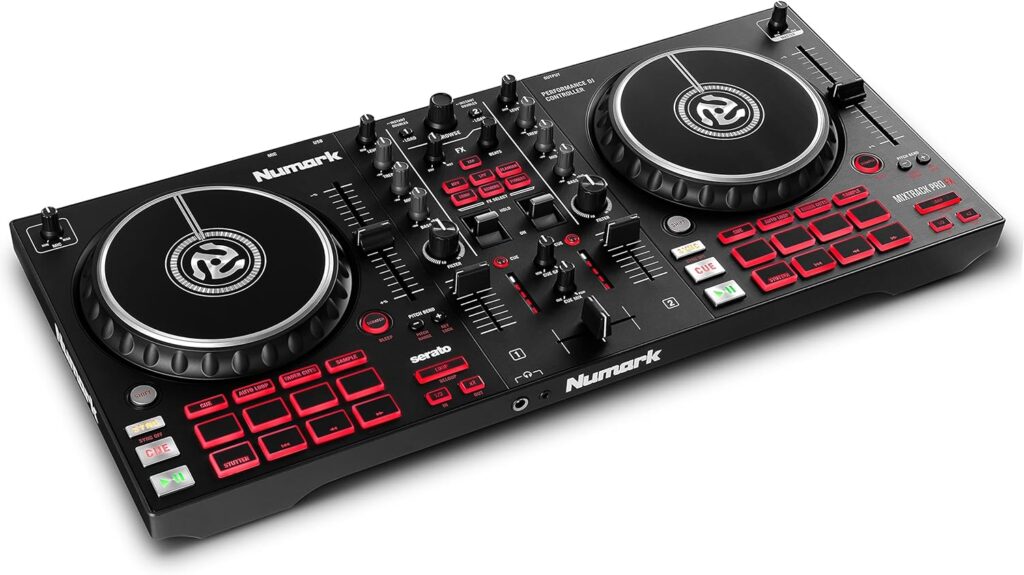
  2. Numark Mixtrack Pro 3:
    • The Numark Mixtrack Pro 3 is a budget-friendly option with features like touch-sensitive jog wheels, dedicated filter knobs, and performance pads. It comes with Serato DJ Intro.
  3. Hercules DJControl Inpulse 300:
    • The Hercules DJControl Inpulse 300 is specifically designed for beginners, featuring an Intelligent Music Assistant (IMA) to help with learning DJ techniques. It comes with DJUCED software.
  4. Denon DJ MC4000:
    • The Denon DJ MC4000 is a more advanced controller that offers a good balance for beginners and intermediate DJs. It has a solid build, professional features, and compatibility with Serato DJ Lite.
  5. Numark Party Mix:
    • The Numark Party Mix is an ultra-affordable and compact DJ controller with built-in light shows. It’s a good entry-level option for those who want a simple setup to start learning.
  6. Roland DJ-202:
    • The Roland DJ-202 is a compact and feature-packed controller designed for beginners. It integrates with Serato DJ Lite and comes with a built-in drum machine.
  7. Pioneer DJ DDJ-400:
    • The Pioneer DJ DDJ-400 is a controller that closely resembles the layout of club-standard CDJs and mixers. It’s designed to be beginner-friendly and includes tutorials in the rekordbox software.
  8. Reloop Beatpad 2:
    • The Reloop Beatpad 2 is an iOS-compatible DJ controller that works well with popular DJ apps. It offers a range of features and is suitable for beginners looking to use their iPad for DJing.

When choosing a DJ controller for beginners, consider factors such as software compatibility, build quality, ease of use, and the specific features that align with your learning goals. Additionally, check for the latest models and read reviews to ensure you’re getting the most up-to-date and well-received equipment.

Wireless Xbox Gaming Headset

If you are a serious gamer and enjoy playing against friends and rivals in the online world, you will know that a wireless Xbox gaming headset is essential to get the best experience possible. With a direct wireless connection to your console, you’re ready for action and there is no need for any adaptors or wires to restrict your gaming ability.

Have a look at this great Turtle Beach headset on Amazon for a great all round gaming experience.

How good are the headsets

There are many different headsets available with a variety of features to enhance the gaming experience. This is facilitated by Microsoft’s new Xbox wireless direct to console tech and Windows Sonic surround sound that enables you to hear even the quietest patter of footsteps to the foe skulking about preparing for an ambush while loading their weapon. You become immersed in the sound and the feeling of living in the virtual world is all the more real.

What features to look for?

So what features and issues should you be looking out for in a wireless Xbox gaming headset? Comfort has to be a top priority when you might be gaming for a period of time. All the top wireless Xbox headsets will have over the ear cups and that does apply pressure to the ears, a little more so if you wear glasses.

So look out for designs that put comfort to the fore as much as say sound quality. Soft cushions and a wearable durable fabric on the cushions can make a huge difference. Some have memory foam which will mould to the individual’s ears and add to the comfortability. And over the ear will fit better than on the ear. The padding on the underside of the head strap should also be thick enough so it does not irritate the top of your head. There is not much point in having fantastic sound if you can only listen to it for short periods before the discomfort becomes too much.

Key features of your headset

Another important feature is the microphone. You will be talking to fellow players and need a high sensitivity mic that produces clear audio so all can hear your in game chat. Some headsets offer a flip up mic which allows you to mute the microphone so you can quickly, easily and temporarily cut out your voice if you needed to speak to someone else not playing the game or if you had a coughing fit for example. Volume control is essential to hear and be heard while something like a bass enhancer will add more power and drama to the sound. A neat button on the headset that can give different boosting options for hearing and voice control will add to your seamless gaming experience. If this feature is a priority then you should look for the best wireless microphone headset you can find.

Rechargeable or batteries?

A rechargeable headset is our preference so that you save on batteries. Most headsets will come with the internal battery already charged and you can pair them up straight away with the dongle that gets connected to the game console and get going. Sixteen hours battery life is achievable on many headsets which will provide enough time for even the most hardened gamers. Others don’t even need the dongle and just connect directly to the wireless Xbox gaming headset.

Active noise cancellation is another feature to look out for so that external sounds are kept to a minimum and you can concentrate on the game you’re playing. And this works also if you are using the headset to watch a movie and you want to become totally immersed in the sound.

You will also want to be aware of the distance you will be using the headset away from the console and the quality of the connection. Lag free audio is crucial to the whole gaming experience so a distance of up to 20 feet will give you plenty of scope and allow you the freedom to move around if you so wish.

Options with your wireless Xbox gaming headset

A nice little added option on some headsets is a cool gaming headphone stand. Something like a glass head headphone stand would be really great to hang your headset when not in use. Something else to consider is a gaming headset carrying case for on the go gamers.

Of course if you are a user of another platform like Sony and price is a restriction, then you would want to look for the best PS4 headset under 100. And you might be a PC gamer starting off trying to find the best gaming laptop under 500 to pair up with a wireless headphone set. You might struggle under 500 but something like this HP Pavilion 15-bc508na 15.6 Inch is not significantly more and well worth considering.

Finally when choosing your best wireless gaming headset, make sure it is compatible with your particular console before making your purchase.